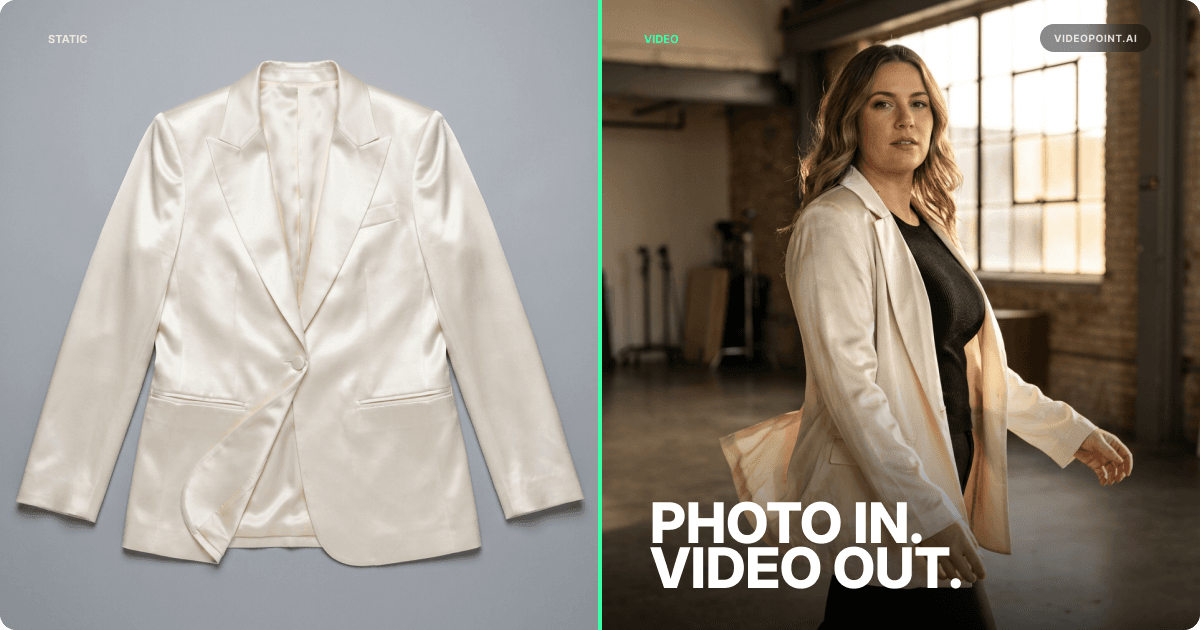
AI Virtual Try-On for Fashion: How It Works and Why It Reduces Returns
AI virtual try-on shows shoppers how a garment looks on a body before they buy, so fewer orders come back as a surprise. How it works, what it costs, and how to add it.

- Published:
- Updated:
- Reading time:
- 5 min read
Online fashion lives with high return rates, and the costly returns are about fit and look: the piece arrived and it wasn't what the shopper pictured. AI virtual try-on goes after that gap. It shows the garment on a body like the shopper's before they buy, not after it arrives.
How AI Virtual Try-On Works
AI virtual try-on takes a product photo and generates a realistic image or video of that garment on a body: a model, an avatar, or the shopper.
Try-on in 2026 runs on generative AI, not the older AR overlay approach, and it needs no 3D models. The AI reads the garment from the product photo (fabric, shape, how it hangs) and generates a new image or short video of the item worn on a body. The output accounts for how the fabric would naturally sit, fold, and move on that body shape.
Two approaches exist:
Pre-generated try-on (what VideoPoint does): The brand generates try-on videos in advance from its product photos and a set of avatars. The videos go on the store for every shopper to watch, and nobody uploads anything.
Shopper-uploaded try-on (what TryPoint does): The shopper uploads their own photo and sees the garment on their own body. It is the more personal of the two, and because it asks for a photo, privacy handling matters. TryPoint, a separate app, deletes shopper photos within 24 hours and never uses them to train AI.
In VideoPoint, try-on is a step in the AI Creator. It pulls product photos from your Shopify catalog, puts the garment on a pre-built or custom avatar, and generates the video. Because the video is built from your product, it comes linked to that product, so the Add to cart button appears in the video without a tagging step. The videos go live as shoppable widgets on your home, collection, and product pages.
The Return Rate Problem in Fashion E-Commerce
Fashion returns are not a small operational cost. They are a structural profitability problem.
Every return costs shipping, handling, and restocking, and it wipes out the margin on a sale you already paid to win.
The returns try-on can do something about are the ones about fit and look. The piece didn't sit the way the shopper expected, or it didn't look the way it did on the product page. Both come from the same gap: the shopper had to imagine the garment on their own body and guessed wrong.
Virtual try-on closes that gap by showing the garment on a body before the purchase decision. The shopper sees drape and proportion before committing.
Which Product Types Benefit Most from Virtual Try-On
Virtual try-on does not deliver equal value across all fashion categories. Prioritize by fit sensitivity.
Highest impact:
- Dresses: The same dress sits differently on every body, so the shopper's guess is hardest here.
- Outerwear: Expensive items where fit decides keep-or-return. Shoulder fit, sleeve length, proportion.
- Pants and bottoms: Rise, leg width, and length decide whether they stay.
Moderate impact:
- Tops and blouses: Less fit-sensitive but still benefit from showing fabric drape.
- Activewear: Compression fit and stretch are difficult to photograph.
Lower impact:
- T-shirts and basics: Simple silhouettes that shoppers already know how to buy.
- Accessories: Handbags and jewelry benefit more from 360-degree product videos.
Start with your most fit-sensitive categories. Measure the result on your own store (see below), then expand.
How to Add Virtual Try-On to a Shopify Store
Implementation requires no custom development and no new photography.
- Connect the Shopify catalog. VideoPoint pulls product photos directly from Shopify.
- Select products for try-on. Pick the fit-sensitive categories from the list above.
- Choose avatars. VideoPoint includes pre-built avatars across different body types. Custom avatars, built from a prompt or a reference photo, keep the look on-brand.
- Generate try-on videos. Each video takes about 5–10 minutes to generate. Bulk generation runs hundreds of products in one go.
- Publish as shoppable video. Try-on videos go live as Stories, Highlights, Carousel, or Video Landing Page widgets on your home, collection, and product pages.
A brand can go from no try-on coverage to live videos in hours, not weeks.
For shopper-facing try-on, TryPoint installs from the Shopify App Store in one click, with no theme code, and puts a try-on button on product cards, collection pages, and the home page.
How to Measure Try-On on Your Own Store
A return figure from someone else's store says little about yours: the category, price point, and customer are different. Measure it directly.
- Set up a fair test. Add try-on to one fit-sensitive category and keep a similar category without it.
- Track return reasons, not just the return rate. Fit and look returns are the ones try-on can move. Damaged or late orders are not.
- Watch conversion next to returns. VideoPoint's analytics follow each video from view to order. TryPoint's dashboard shows try-on conversion rate, attributed revenue, and ROI.
- Wait out your return window. Judge the test only after orders from the test period are past your return window.
Limitations and What Virtual Try-On Cannot Do Yet
Fabric simulation is not perfect. Lightweight, flowing fabrics (silk, chiffon) are the hardest to render accurately. Heavy, structured fabrics (denim, leather, wool) render more accurately. Review flowing pieces before they go live.
Fit prediction is visual, not dimensional. Try-on shows how a garment looks on a body type. It does not measure the shopper's exact body dimensions or guarantee fit at a specific size. It supplements size charts, it does not replace them.
Avatar libraries don't cover every body. Pre-built avatars cover a range of body types, not all of them. For the builds your customers have that the library misses, create custom avatars from a prompt or a reference photo.
It is a supplementary tool. Virtual try-on cuts surprise returns; it does not end them. It works best alongside detailed size guides, customer reviews that mention the reviewer's size, and clear product descriptions.
Frequently Asked Questions
How does AI virtual try-on work for fashion?
Generative AI reads the garment in a product photo – its shape, fabric, and how it should hang – and generates an image or video of it worn on a body. VideoPoint uses it to make try-on videos in advance: your product photo on a pre-built or custom avatar, published on your store for every shopper to watch. TryPoint, a separate app, does it live: the shopper uploads a photo and sees the garment on their own body.
Does virtual try-on actually reduce return rates?
It goes after the returns that cost the most: the garment arrived and didn't look or sit the way the shopper pictured. Seeing it on a body before buying closes that gap. Try-on shows how a piece looks, not which size to order, so keep it next to your size chart. Measure the result on your own store by comparing return reasons on products with try-on against similar products without it.
What does virtual try-on cost for a Shopify store?
It depends on which kind you add. VideoPoint's try-on videos are made in its AI Creator and use the plan's AI points like any other video. VideoPoint plans are Free ($0), Basic ($19.99), Grow ($99.99), and Advanced ($299.99) a month, metered by AI points and video views. TryPoint, the shopper-facing try-on, is a separate app with its own plans, starting with a free plan. Both work from the product photos already in your Shopify catalog.
Which clothing categories benefit most from virtual try-on?
Fit-sensitive pieces gain the most: dresses, outerwear, and pants, where the cut sits differently on every body. Tops and activewear gain less but still benefit from showing drape and stretch. Basics like t-shirts gain the least per SKU. Accessories are better served by 360-degree product videos than by body-based try-on.
Do customers need to upload their own photo?
Not for VideoPoint's try-on videos. They are made in advance on pre-built or custom avatars, and shoppers watch them on the product page without uploading anything. TryPoint works the other way: the shopper uploads a photo to see the garment on their own body, and TryPoint deletes that photo within 24 hours and never uses it to train AI.

CEO & Founder, VideoPoint
Kostas Zhukov is the CEO and Founder of VideoPoint, an AI video commerce platform for Shopify fashion brands. A 12-year entrepreneur who has built and sold D2C brands, led startups across logistics, payments, and marketing technology, and helped build a company that was acquired by a major tech firm, he writes about video commerce, e-commerce growth, and AI for retail.
 5.0 on Shopify
Add Try-On Videos to Your Store
VideoPoint puts your garments on pre-built or custom avatars and publishes the videos as shoppable video on your home, collection, and product pages.
Start FreeFree plan and free trial available