Backed by
Google logo
5.0
on Shopify

AI Video for Fashion

Create at 6% of the cost. 100x faster.
Distribute across your store, socials, and ads.
All in one place.
Backed by
Google logo

Templates

Start instantly, skip the blank page and prompts.

Runway Walk Turnaround

Create cinematic runway walk videos with seamless turnaround: model walks toward camera, pose...

Lookbook

Generate cohesive lookbook images and a subtle 5-second motion video from a selected frame...

Ghost 360

Generate clean ghost mannequin product images (no person) from multi-view inputs, then create a 5...

Product 360

Generate a smooth 360-degree rotation video showcasing your product from all angles.

Street Portrait

Capture a natural, unposed street-style photograph of your model in a location of your choosing...

Red Curtain Couple

Create editorial lifestyle couple portraits in a vintage photo booth style with red velvet curtain backd...

Testimonials

What fashion brands have to say.
“From 24% CR uplift to AI content creation at scale”
Stephan Attar
Partner & COO
“Tried them all, switched to VideoPoint and never looked back”
James Swales
Founder & CEO
"Immediate conversion lift and great support"
Fabian Frei
Founder & CEO
“VideoPoint became one of our most powerful revenue tools”
Ieva Jasiuvenaite
Founder & CEO
“Shoppable video that actually drives results”
Gabriele Kerpyte
Founder & CEO
“From 24% CR uplift to AI content creation at scale”
Stephan Attar
Partner & COO
“Tried them all, switched to VideoPoint and never looked back”
James Swales
Founder & CEO
"Immediate conversion lift and great support"
Fabian Frei
Founder & CEO
“VideoPoint became one of our most powerful revenue tools”
Ieva Jasiuvenaite
Founder & CEO
“Shoppable video that actually drives results”
Gabriele Kerpyte
Founder & CEO
“From 24% CR uplift to AI content creation at scale”
Stephan Attar
Partner & COO
“Tried them all, switched to VideoPoint and never looked back”
James Swales
Founder & CEO
"Immediate conversion lift and great support"
Fabian Frei
Founder & CEO
“VideoPoint became one of our most powerful revenue tools”
Ieva Jasiuvenaite
Founder & CEO
“Shoppable video that actually drives results”
Gabriele Kerpyte
Founder & CEO
“From 24% CR uplift to AI content creation at scale”
Stephan Attar
Partner & COO
“Tried them all, switched to VideoPoint and never looked back”
James Swales
Founder & CEO
"Immediate conversion lift and great support"
Fabian Frei
Founder & CEO
“VideoPoint became one of our most powerful revenue tools”
Ieva Jasiuvenaite
Founder & CEO
“Shoppable video that actually drives results”
Gabriele Kerpyte
Founder & CEO

AI Creator

Your product data, templates, avatars, and top AI models — all in one chat.
Live Demo

Get AI Demo Video
with Your Product

Enter your Shopify product URL
and get AI-generated video of your product.
Thank you! Your submission has been received!
Oops! Something went wrong while submitting the form.

Avatars

Make products relatable to everyone with pre-made and custom avatars.
Create avatar

Shoppable Videos

Publish across your storefront and drive revenue.
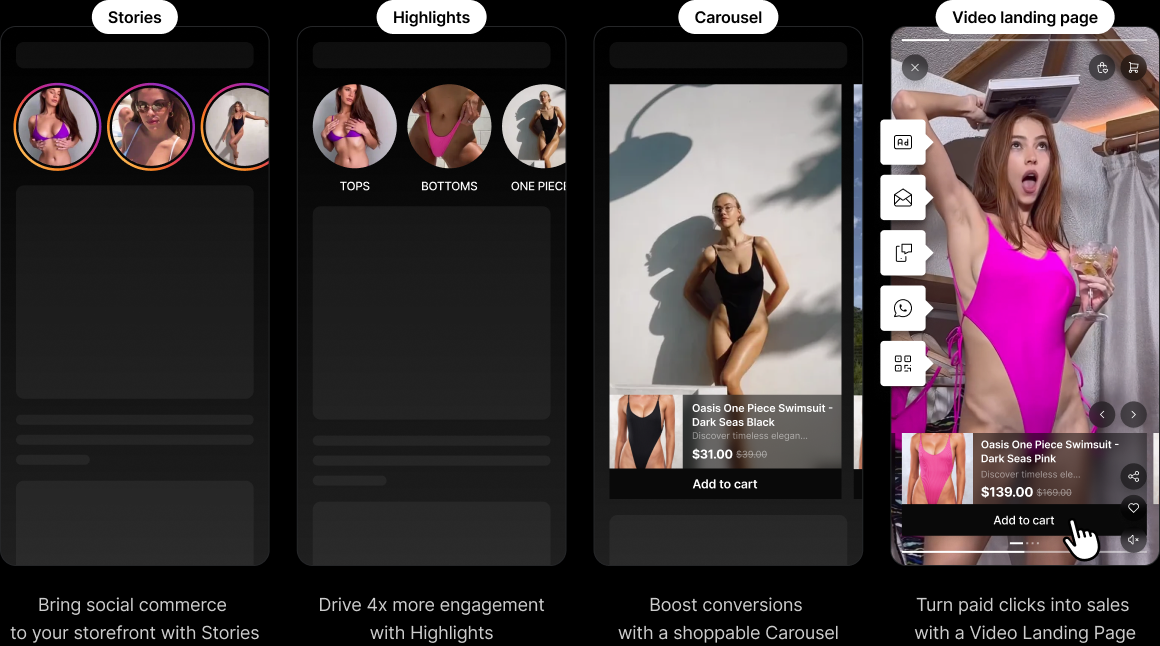
Stories
Bring social commerce to your storefront with Stories
Highlights
Tops
Bottoms
one pieces
Best sellers
sale
Tops
Bottoms
one pieces
Drive more engagement with best-in-class Highlights
Carousel
Tops
Bottoms
one pieces
Best sellers
sale
Boost conversions with a shoppable Carousel
Video Landing Page
Turn paid clicks into sales 
with a Video Landing Page
Ad iconEmail iconChat iconWhatsApp iconIcon
Live Demo

Experience Shoppable Video Live with Your Videos and Products

Enter your Instagram handle and Shopify store URL toget alive demo store URL with your videos and products inshoppable video widgets.
Thank you! Your submission has been received!
Oops! Something went wrong while submitting the form.

Analytics

Track video impact across the funnel.
Get insights instantly by asking questions through AI chat.
Try Point logo

More Sales, Fewer Returns

With best-in-class fashion AI virtual try-on.
Live Demo

See Virtual Try-On
in Action

Paste a Shopify product URL, add your photo,
and watch the product on you in seconds.
Uploading...
fileuploaded.jpg
Upload failed. Max size for files is 10 MB.
Thank you! Your submission has been received!
Oops! Something went wrong while submitting the form.
5.0
on Shopify

It's Time For VideoPoint.

Free plan and free trial available

FAQ

Questions people ask before they hit “Start Free”.

Getting Started

What is VideoPoint?

VideoPoint is an AI-powered video commerce platform for Shopify. It combines AI content creation and shoppable video in one app. Use AI Studio to create product videos, photos, and ads from your existing product images, then make all your video content shoppable with widgets that drive sales directly on your store.

How does VideoPoint work?

Install the Shopify app and your product catalog syncs automatically. From there you can do two things. First, create new content: open AI Studio, pick a template or describe what you want, and generate videos and photos using your product data, avatars, and the latest AI models. Second, make content shoppable: import existing videos from Instagram or TikTok (or upload your own), tag products, and embed shoppable video widgets on your store pages. Track everything in the analytics dashboard.

Who is VideoPoint for?

Shopify brands in fashion, apparel, swimwear, beauty, and personal care that need product content at scale. Whether you are a small brand that cannot afford traditional photo and video shoots, or a growing brand that needs hundreds of product videos across your catalog, VideoPoint is built for you.

What can I create with VideoPoint?

You can create product videos for your store pages (PDPs), social content like Instagram Reels and TikTok videos, ad creatives, lookbook imagery, 360-degree product rotation videos, runway-style walk videos, ghost mannequin product shots, lifestyle portraits, and more. All generated from your existing product photos using AI.

AI Content Creation

What is AI Studio?

AI Studio is VideoPoint's content creation workspace. It brings together your product data, templates, avatars, and the best AI models in a single chat interface. Describe what you want or pick a template, and AI Studio generates videos and photos for your products. No need to switch between separate AI tools, video editors, or design apps.

What is AI Creator?

AI Creator is the chat-based interface inside AI Studio. You type what you need (for example, "create a runway walk video for this dress on a beach background"), and AI Creator generates the content using your product images and the AI model best suited for the job. It works in any language.

What templates are available?

VideoPoint offers ready-made templates so you can skip prompting and get results instantly. Current templates include:

  • Runway Walk Turnaround: Cinematic runway walk videos where a model walks toward the camera and turns. Built for fashion product pages and social content.
  • Lookbook: Cohesive lookbook images plus a 5-second motion video from a selected frame. Great for editorial-style product storytelling.
  • Ghost 360: Clean ghost mannequin product images (no person) from multiple angles, plus a rotation video. Ideal for product pages that need a clean, professional look.
  • Product 360: Smooth 360-degree rotation video showing your product from every angle.
  • Street Portrait: Natural, unposed street-style photos of your model in a location you choose.
  • Red Curtain Couple: Editorial lifestyle couple portraits in a vintage photo booth style.

New templates are added regularly. On the Basic plan and above, you can also request custom templates.

What AI models does VideoPoint use?

VideoPoint integrates multiple AI models and selects the best one for each task. Current integrations include models from Google (Gemini, Veo), OpenAI (ChatGPT), Kling, Grok, and others. As new models are released, VideoPoint adds them so you always have access to the latest technology without switching tools.

What are avatars and how do they work?

Avatars are AI-generated models that wear your products in videos and photos. VideoPoint fits your garments from flat-lay or product photos onto avatars, creating realistic visuals of people wearing your items. Pre-made avatars are available on all plans. On Basic and above, you can create custom avatars that match your brand's look and target audience.

How does bulk generation work?

Bulk-Generate lets you create videos for your entire product catalog in minutes instead of months. Select the products, choose a template, and VideoPoint generates videos across your catalog automatically. This is available on the Basic plan and above.

What product photos do I need to get started?

Your existing Shopify product images are enough to start. For best results with avatar and try-on features, front and back photos work best. VideoPoint uses front and back images to avoid errors in rear-view visuals. Standard product photos on a white or plain background work well.

How long does it take to generate a video?

Most 5-second AI videos generate in under a few minutes. The exact time depends on the template, resolution, and current demand. Bulk generation of an entire catalog can finish in minutes to hours depending on catalog size.

Can I use AI-generated content for ads and social media?

Yes. Content created in AI Studio is yours to use across channels: product pages, Instagram Reels, TikTok, Facebook and Google ads, email campaigns, and anywhere else you publish. There are no usage restrictions on content you generate.

What is the quality of AI-generated videos?

VideoPoint uses the latest generation of AI models, which produce realistic fabric movement, accurate garment details, and natural-looking model poses. Quality continues to improve as new models are integrated. You can preview results with the free plan before committing to a paid tier.

Shoppable Video

What are shoppable video widgets?

Shoppable video widgets are interactive video players you embed on your Shopify store pages. Shoppers watch videos and can click to view or add products to their cart without leaving the video. Widget types include Stories, Highlights, Carousel, and Video Landing Pages.

What types of shoppable widgets can I add?
  • Stories: Full-screen, swipeable video stories on your storefront. Great for social-style browsing.
  • Highlights: Curated video collections that stay pinned on your pages. Drive engagement with your best-performing content.
  • Carousel: Scrollable video carousels that boost product discovery and conversions.
  • Video Landing Pages: Dedicated full-screen shoppable video pages. Ideal for routing paid ad traffic to a video-first shopping experience instead of a static page.

You can place widgets on product pages, collection pages, your homepage, or any custom page. All plans include unlimited widgets.

What video sources can I use for shoppable widgets?

You can use videos from three sources. Videos you create with AI Studio. Videos auto-imported from your Instagram Reels (including collaborations and mentions) or TikTok. And any videos you upload manually, whether from influencers, creators, or your own shoots. Content types that work well include testimonials, product demos, reviews, behind-the-scenes footage, before-and-after comparisons, and UGC.

How does AI product tagging work?

VideoPoint's AI detects products visible in your videos and automatically tags them, making the videos instantly shoppable. You can also refine or add tags manually. On top of that, you can set up auto-add rules so new videos are automatically assigned to the right widgets based on product tags.

Where does the sale happen?

Every sale happens on your Shopify store. VideoPoint tracks how videos influence purchases across the full funnel, from widget impressions to video views to add-to-cart actions to completed orders.

AI Virtual Try-On

Does VideoPoint offer virtual try-on?

Yes. VideoPoint integrates with TryPoint, our dedicated AI Virtual Try-On app for Shopify. Shoppers upload a photo and see your garments on themselves in seconds, powered by Google's virtual try-on AI. This helps increase purchase confidence and reduce returns. TryPoint is available as a separate Shopify app with its own pricing.

Results & ROI

How much can VideoPoint increase my conversion rate?

With Done-with-You Setup, brands see an average 11%+ conversion rate uplift within 30 days. Individual results vary. One customer, Minimale Animale, reported a 24% conversion rate uplift. Your results depend on your content quality, widget placement, traffic volume, and product category.

How much does AI content creation cost compared to traditional production?

VideoPoint generates content at roughly 5-6% of the cost of traditional video production. A product video that might cost thousands of dollars with a studio, models, and post-production can be created for a fraction of that using AI Studio and your existing product photos. Content also ships in minutes instead of weeks.

Can I track performance metrics?

Yes. VideoPoint provides a detailed analytics dashboard that tracks:

  • ROI and revenue impact: Overall return on investment and revenue generated by shoppable videos.
  • Conversion metrics: Video conversion rates, add-to-cart actions, orders, and revenue uplift.
  • Funnel performance: Widget impressions, video views, product card clicks, add-to-carts, and completed purchases.
  • Engagement and watch time: Average watch time per visitor, total time spent, and average videos watched per engaged visitor.
  • Video-level analytics: Performance of each individual video with conversion and revenue attribution.

On the Advanced plan, you can also ask questions about your data through AI chat analytics.

Features & Performance

Will VideoPoint slow down my website?

VideoPoint's widgets are optimized for speed. Videos are lazy-loaded (they only load when visible on screen) and compressed. Like any rich content, video adds some data to your pages, but we work to keep the impact minimal. The Grow plan and above include a done-with-you setup where we run speed tests to measure the real-world impact and optimize your configuration.

Does VideoPoint work with all Shopify themes?

Yes. VideoPoint integrates through Shopify's native app blocks and works with all modern themes without coding. For older themes that don't support app blocks, you can embed widgets using a custom code block with the provided HTML. The widgets automatically match your theme's look and feel.

What languages does VideoPoint support?

The app interface is in English. However, AI Creator works in any language, so you can generate content and give prompts in your preferred language. Shoppable video widgets adapt to your store's language settings.

Pricing & Subscription

Is there a free plan?

Yes. The free plan includes 1,500 one-time AI Points (enough for roughly 15 five-second videos), 200 monthly video views, all templates, pre-made avatars, social import, and unlimited shoppable widgets. It is a full-featured way to test both AI content creation and shoppable video on your store.

How much does VideoPoint cost?

VideoPoint offers five plans:

  • Free: $0/month. 1,500 one-time AI Points, 200 video views/month. All core features included.
  • Starter ($9.99/month): 1,500 AI Points/month, 1,000 video views/month. Adds branding removal, detailed analytics, and 24/7 support. 4-day free trial.
  • Basic ($19.99/month): 3,000 AI Points/month, 2,000 video views/month. Everything in Starter plus bulk generation, custom templates, custom avatars, and feature requests. 7-day free trial.
  • Grow ($99.99/month): 18,000 AI Points/month, 20,000 video views/month. Everything in Basic plus custom template requests, done-with-you setup, roadmap priority, and early feature access. 14-day free trial.
  • Advanced ($299.99/month): 60,000 AI Points/month, 100,000 video views/month. Everything in Grow plus AI chat analytics, co-create features, monthly strategy calls, partner network access, and a dedicated Slack/WhatsApp channel. 21-day free trial.

Additional AI Points and video views can be purchased on any paid plan at decreasing rates per tier.

What are AI Points?

AI Points are credits used to generate AI-powered images and videos. Each video or photo generation consumes points based on length and complexity. As a rough guide, 1,500 AI Points produce approximately 15 five-second videos. Points reset monthly on paid plans. On the free plan, you receive a one-time allocation of 1,500 points.

Can I buy more AI Points if I run out?

Yes. Additional AI Points are available on all paid plans at tiered rates: $6 per 1,000 on Basic, $5 per 1,000 on Grow, and $4 per 1,000 on Advanced. Additional video views are also available at similar tiered pricing.

Can I cancel anytime?

Yes. You can cancel, downgrade, or upgrade your plan at any time from your Shopify account. There are no long-term contracts. All charges are billed in USD every 30 days.

Setup & Support

How do I install VideoPoint?

Install VideoPoint from the Shopify App Store. Your product catalog syncs automatically. From there you can start creating AI content in AI Studio and setting up shoppable widgets on your store pages. The whole process takes about five minutes.

What is Done-with-You Setup?

Done-with-You Setup is included on the Grow plan and above. Our team works alongside you to maximize performance by strategically placing video widgets across your store pages, helping you structure and arrange content into the right widgets, and running speed tests to optimize page load. The goal is to get you live with best practices from day one.

What if I need help?

Support varies by plan. The free plan includes community and email support. Basic and above include 24/7 chat support. Grow includes a dedicated setup. Advanced includes monthly strategy calls and a dedicated Slack or WhatsApp channel. You can also access our Help Center and blog for self-service guides.

Can I use VideoPoint with other apps?

Yes. VideoPoint integrates with Shopify's checkout, Instagram, TikTok, TikTok Shop, and various AI models. It also works alongside TryPoint (AI Virtual Try-On) for a complete video commerce and try-on experience.

Ask AI about VideoPoint.ai